
Sunday, March 20, 2011
0
How to Tripple Adsense CTR
Before we begin, Let's define first what is a CTR. CTR is Clickthrough rate, it's a way of measuring your success with adsense advertising. If you have 100 visitors to your website and 1 of them click your ad, your CTR would be 1%.
1/100=0.01 x 100%= 1%.
Let's say you got $1 for that click. What if you made changes to your layout, and adsense colors and improve your ctr up to 3%. That would make you 3/100 per visitors. You would be earning at least $3 for every 100 visitors you get. That's an easy way to improve your earnings if you ask me.
So if you can improve your ctr at least 3 times that would definitely help your earnings in adsense.
Tip #1: Don't Make your Ads look Like a Ads
Most users have experience banner blindness. They tend to ignore anything that looks like an Advertisement. Even if the user is interested in the ads, they will most likely not click it because of this reason. So you have to put where your ads are mostly like seen by the user. So you need to put them in the right place where users can see them.Check out this Heat Map from adsense:
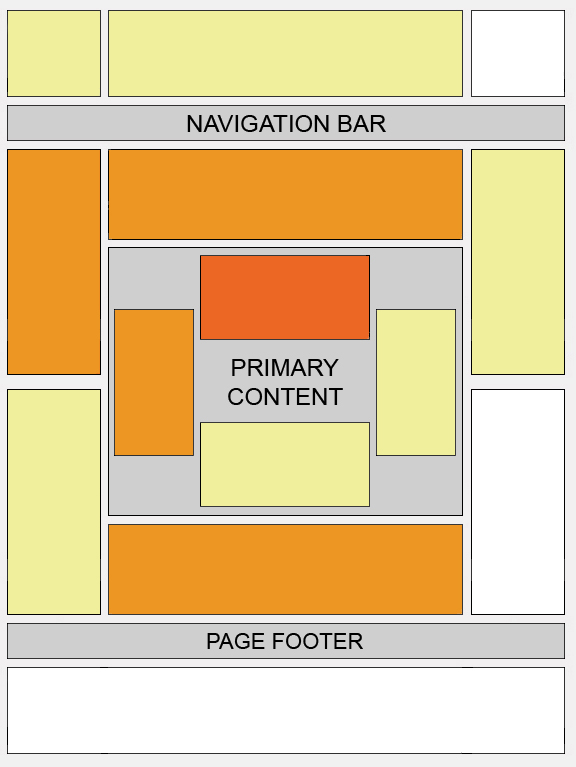
From Adsense: This "heat map" illustrates the ideal placing on a sample page layout. The colors fade from dark orange (strongest performance) to light yellow (weakest performance). All other things being equal, ads located above the fold tend to perform better than those below the fold. Ads placed near rich content and navigational aids usually do well because users are focused on those areas of a page.
Of course you still need to experiment on your placement. This is just a guideline not a rule.
Tip #2: Always Use the Best Performing Ads
Here are the top performing ads for me:
1. 336 x 280
2. 300 x 250
3. 728 x 90
4. 120 x 240
5. 160 x 600
6. 120 x 600
7. 468 x 60
As you can see in the list. 468 X 60 just doesn't perform well for me. This ad seems to be ignore most of the time. It's a one of those banner blindness. Now I'm not saying you should not use this ad this is just from experience. There are other ways to improve your CTR using this 468 X 60 ad. An example would be putting it at the header as graphic ad. Although I cannot comment on this because I have never actually tried but some people have been successful using this approach.
728 x 90 is a bigger ad of 468 X 60 but doesn't get ignored much as 468 X 60. The 120 x 240, 160 x 600 and 120 x 600 get lower CTR because they are usually put in the sides. As you can see up in the heat map. Users don't look much at the sides.
The best performing ads for me are 336 x 280 and 300 x 250 ads. The great thing about this is that you can put them anywhere in your website thus giving you a better CTR.
Tip #3: Choose the Best Color Combination for You Ads
Here is what worked for me and might work on your sites also. If I have a white background in my site, I would also use white as an ad background and border colors for my adsense ads. So if you have a site that has blue or pink. Make your adsense ad background and border blue or pink also. This way it won't look like another banner blindness advertisement.They will blend in with your website. Most of the time I use blue for Link color and make the the the url color non Dark green which is the standard color for the adsense ads. I always use the same color for Text colors and url colors. If I use either black or gray for text colors, I would also use the same color for the url color. I make it rule of thumb that if I was using blue colors for the navigation links or any other links, I would use blue also for the Link title of the adsense.
Tip #4: Put You Ads in the Best Positions
Putting your ads on the sides and in the bottom will lower your CTR. As you can see in the heatmap above. Users will most likely not see your Ad. We want them to see the ad. When a user browse your website. They are looking first for your content. So if you structure your ads around your content, that will boost your CTR. Here is an example:

Putting your ads inside the content greatly increases your CTR. Users will see the ads and get interested and will click on it. Here is what I usually do. I use 336 x 280
or 300 x 250 in the content. I would put one inside the title, the 2nd one would be in the middle of the content and the last one would be after the content which would be just before the author's box like in the ezine.
For the ad links I usually put them in the navigation links. Here is an example:

Notice the navigation links look exactly like the ad links. This improves your ctr a lot.
I hope this tips will help you improve your income in adsense. You will need to experiment in order to get the best results. I recommend you make changes for a week and see what happens if your ctr is doing better. If it's not try making changes again and see the results for a week.
Of course none of this will help if you if you are not getting enough TRAFFIC. You will need to have constant traffic to see the results from your experiment. Just remember the saying here:
TRAFFIC IS THE KING, CONTENT IS THE QUEEN.
1/100=0.01 x 100%= 1%.
Let's say you got $1 for that click. What if you made changes to your layout, and adsense colors and improve your ctr up to 3%. That would make you 3/100 per visitors. You would be earning at least $3 for every 100 visitors you get. That's an easy way to improve your earnings if you ask me.
So if you can improve your ctr at least 3 times that would definitely help your earnings in adsense.
Tip #1: Don't Make your Ads look Like a Ads
Most users have experience banner blindness. They tend to ignore anything that looks like an Advertisement. Even if the user is interested in the ads, they will most likely not click it because of this reason. So you have to put where your ads are mostly like seen by the user. So you need to put them in the right place where users can see them.Check out this Heat Map from adsense:
From Adsense: This "heat map" illustrates the ideal placing on a sample page layout. The colors fade from dark orange (strongest performance) to light yellow (weakest performance). All other things being equal, ads located above the fold tend to perform better than those below the fold. Ads placed near rich content and navigational aids usually do well because users are focused on those areas of a page.
Of course you still need to experiment on your placement. This is just a guideline not a rule.
Tip #2: Always Use the Best Performing Ads
Here are the top performing ads for me:
1. 336 x 280
2. 300 x 250
3. 728 x 90
4. 120 x 240
5. 160 x 600
6. 120 x 600
7. 468 x 60
As you can see in the list. 468 X 60 just doesn't perform well for me. This ad seems to be ignore most of the time. It's a one of those banner blindness. Now I'm not saying you should not use this ad this is just from experience. There are other ways to improve your CTR using this 468 X 60 ad. An example would be putting it at the header as graphic ad. Although I cannot comment on this because I have never actually tried but some people have been successful using this approach.
728 x 90 is a bigger ad of 468 X 60 but doesn't get ignored much as 468 X 60. The 120 x 240, 160 x 600 and 120 x 600 get lower CTR because they are usually put in the sides. As you can see up in the heat map. Users don't look much at the sides.
The best performing ads for me are 336 x 280 and 300 x 250 ads. The great thing about this is that you can put them anywhere in your website thus giving you a better CTR.
Tip #3: Choose the Best Color Combination for You Ads
Here is what worked for me and might work on your sites also. If I have a white background in my site, I would also use white as an ad background and border colors for my adsense ads. So if you have a site that has blue or pink. Make your adsense ad background and border blue or pink also. This way it won't look like another banner blindness advertisement.They will blend in with your website. Most of the time I use blue for Link color and make the the the url color non Dark green which is the standard color for the adsense ads. I always use the same color for Text colors and url colors. If I use either black or gray for text colors, I would also use the same color for the url color. I make it rule of thumb that if I was using blue colors for the navigation links or any other links, I would use blue also for the Link title of the adsense.
Tip #4: Put You Ads in the Best Positions
Putting your ads on the sides and in the bottom will lower your CTR. As you can see in the heatmap above. Users will most likely not see your Ad. We want them to see the ad. When a user browse your website. They are looking first for your content. So if you structure your ads around your content, that will boost your CTR. Here is an example:
Putting your ads inside the content greatly increases your CTR. Users will see the ads and get interested and will click on it. Here is what I usually do. I use 336 x 280
or 300 x 250 in the content. I would put one inside the title, the 2nd one would be in the middle of the content and the last one would be after the content which would be just before the author's box like in the ezine.
For the ad links I usually put them in the navigation links. Here is an example:
Notice the navigation links look exactly like the ad links. This improves your ctr a lot.
I hope this tips will help you improve your income in adsense. You will need to experiment in order to get the best results. I recommend you make changes for a week and see what happens if your ctr is doing better. If it's not try making changes again and see the results for a week.
Of course none of this will help if you if you are not getting enough TRAFFIC. You will need to have constant traffic to see the results from your experiment. Just remember the saying here:
TRAFFIC IS THE KING, CONTENT IS THE QUEEN.
Subscribe to:
Post Comments (Atom)


0 Responses to “How to Tripple Adsense CTR”
Post a Comment